Photo Organizer App v2 8 0

Photo Organizer 2.8.0 APK

Updated
December 17, 2014

Size
2.1M

Current Version
2.8.0

Requires Android
2.2 and up

Offered By
HIDEO APPS

Whats New
· Change the Launcher Icon
· Optimization


DOWNLOAD LINKS:
Photo Organizer 2.8.0 APK (Zipyyshare Download Mirror)
Photo Organizer 2.8.0.Apk (Tusfiles Download Mirror)
OR
Get it on Google Play


Read More..

Weather Animated Widgets Free v5 50

Weather Animated Widgets Free 5.50 APK

Updated
March 14, 2015

Size
10M

Current Version
5.50

Requires Android
4.1 and up

Offered By
BVL Applications


DOWNLOAD LINKS:
Weather Animated Widgets Free 5.50 APK (Zippyshare Download Mirror)
Weather Animated Widgets Free 5.50.apk (Tusfiles Download Mirror)
OR
Get it on Google Play


Read More..

How To Add Animated Flash Clock To Your Blogger Blog

Animated Flash Clock To Your Blogger Blog

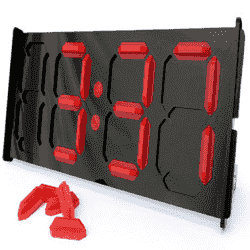
Hello! `How are you guys? heres the cool Clock.this tutorial will show you how to Add animated flash clock gadget your Blogger blog. A clock gives a beautiful look to a website. A clock is a necessity for a personal website, forum, blog etc.Isn’t it exciting when you get a highly quality flash Clock absolutely Free? you can add this flash animated clock your blog easily.ive tested this Flash Clock on internet explorer, mozzilla firefox & many other web browsers. its very fast and fresh.You simply have to copy the code below each clock and add it to your blog.


How To Add Aniamted Flash Clock Widget To Blogger?

  • Choose a type of clock below
  • Provide Require widget title
  • Fill Height and Width of the Widget
  • Click on "Genetate" button
  • Finally click on "Add to Blogger" to add it to your blog.


Add Animated Flash Clock To Your Blogger blog


Now lets start adding it...

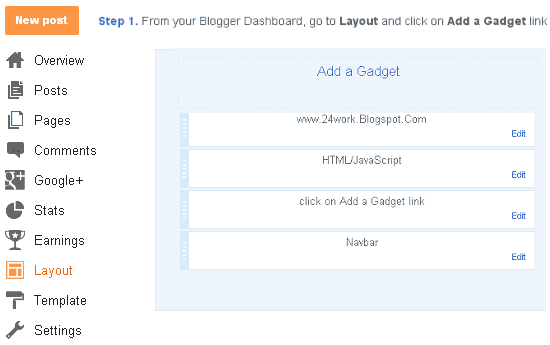
Step 1. Login to Your Blogger Account.Go to your Blogger Dashboard.Click on Layout tab from left pane and click on Add a Gadget link.

Blogger Tips And Tricks|Latest Tips For Bloggers

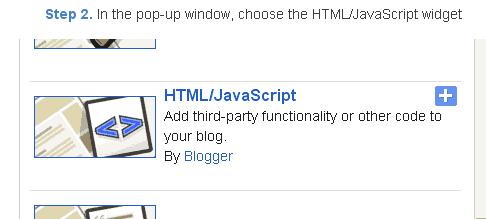
Step 2. After click on Add a Gadget link A pop-up box will open now
with many gadget list, Choose HTML/JavaScript from the gadget options by clicking the blue plus sign for that gadget.

Blogger Tips And Tricks|Latest Tips For Bloggers


Step 3. Select HTML/Javascript and add the one of code given below.

Step 4. Now Click On Save JavaScript You are done.


Happy blogging!


Special Thanks http://flash-clocks.com

Picture From http://www.2dayblog.com/2009/10/19/manual-digital-clock/


Read More..

Blog Archive

Diberdayakan oleh Blogger.