How to Play Teen Patti On PC without Android Emulator

Teen Patti is a renowned card game developed by Octro Inc. This is a free game which accessible on Google Play store for download on your Android Smartphone and tablets. Teen Patti is an online multi-player card game, that you can play with your companions or other individuals from entire World, Once you install this game you need to sign in for playing this game. Teen Patti offers you; two sign in option -
                                                                        1. Play as a guest : In this option you can revel in this game as a Guest, yet this alternative does not permit you to welcome friends.

                                                                        2. Login with Facebook : This choice permit you to play with your Facebook friends on the Public table or a private table. you might additionally welcome your Facebook Friends to play.

At Teen patti; user can enjoy virtual money in dollar by playing with friends.

On the off chance that you need to play Teen Patti on your computer, then follow below  tutorial..
Playing Teen Patti on Computer is not any trick it is a basic and normal thing, which does not require any extra software i.e - Bluestacks or other Android emulator.

Tutorial - How to Play Teen Patti on Computer

For playing  Teen Patti on PC, you require Android Mobile or tablet ( With Teen Patti Install in it), Computer, Facebook account, and active internet connection. In the event that you have all these oblige things then you should begin.

Step 1: Download Teen Patti game and install it on your device.
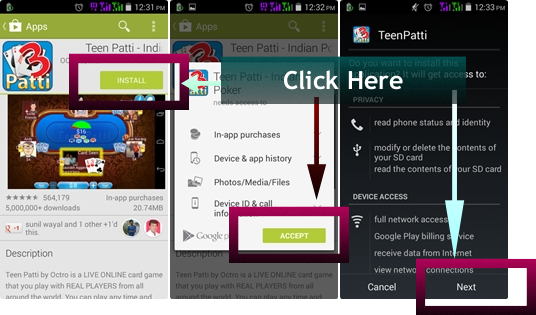
Teen patti Screenshot - Download and Install on your Device

Step 2:  Start/Open Teen Patti and select the Login option - " Login with Facebook" sit tight for some time then a pop out screen show up with "OK" option. ---> click on "OK" ( in this step Teen Patti request your Facebook profile access to bring your friends list and other information which require while playing.)
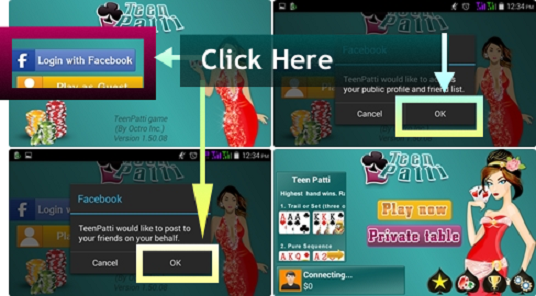
Start Teen patti on Your Device

Step 3: Then click on " Play Now " to play this game on your gadget.( This step also supportive to confirm about your Facebook profile access is finished or not,)

How to Play Teen Patti On PC

Step 4: Now Sign into your Facebook account from your PC, and click on Teen Patti, in App classification

How to Play Teen Patti On PC

Step 5: Wait for some minute and begin playing Teen Patti On your PC.

Enjoy Teen Patti on your Computer !

If you get exhausted to play Teen Patti on your mobile, then why you cant attempt it on your computer, Play this game on your PC and impart your experience to us by remarking beneath.!
Read More..

iWork update for iOS OS X and iCloud brings ability to share password protected files and more


Apple has updated the iWork suite of productivity apps - Pages, Numbers and Keynote - for iOS, OS X and iCloud bringing new features like ability to share password-protected files via iCloud and improved compatibility with Microsoft Office files.


The update brings other new features and improvements to the iOS and OS X versions of apps that seem to focus on UI-related changes, collaboration and compatibility enhancements, greater flexibility when working with certain controls, and more. 9to5Mac details the changes in the iCloud version of the three applications that include a redesigned UI, an ability to see what documents have been shared with you, rich formatting of text in table cells, and more.


The full list of changes in Pages, Numbers and Keynote for iOS and OS X is included below.


Whats new in Pages for OS X version 5.1


  • Vertical ruler.

  • Share password-protected documents via iCloud link.

  • Customizable alignment guides.

  • Set keyboard shortcuts for styles.

  • View character count with or without spaces.

  • Improved precision for inserting and pasting objects.

  • Create charts with date, time, and duration values.

  • Delete sections from the page navigator.

  • Improved compatibility with Microsoft Word 2013 documents.

  • Export password-protected documents to DOCX format.

  • Custom number formats in charts are preserved on import of Pages 09 and Microsoft Word documents.

  • Start a list automatically using new special characters.

  • Improved support for bidirectional text.

  • Improved ePub export.

  • Bug fixes and stability improvements.


Whats new in Numbers for Mac version 3.1


  • Sort by multiple columns.

  • Sort a subset of rows.

  • Text autocompletes when editing cells.

  • Chart date and duration values.

  • Optionally highlight rows and columns on mouseover.

  • Progress indicator for calculations.

  • Custom number formats in charts are preserved on import of Numbers 09 and Microsoft Excel spreadsheets.

  • Share password-protected spreadsheets via iCloud link.

  • Export password-protected spreadsheets to XLSX format.

  • Improvements to AppleScript support.

  • Improved compatibility with Microsoft Excel 2013 spreadsheets.

  • Bug fixes and stability improvements


Whats new in Keynote for Mac version 6.1


  • New transitions including Droplet and Grid.

  • Enhanced presenter display options.

  • Share password-protected presentations via iCloud link.

  • Custom number formats in charts are preserved on import of Keynote 09 and Microsoft PowerPoint presentations.

  • Create charts with date, time, and duration values.

  • Improved compatibility with Microsoft PowerPoint 2013 presentations.

  • Bug fixes and stability improvements.


Whats new in Pages for iOS version 2.1


  • Share password-protected documents via iCloud link.

  • View character count with or without spaces.

  • Export password-protected documents to DOCX format.

  • Start a list automatically using new special characters.

  • Create charts with date, time, and duration values.

  • Improved support for bidirectional text.

  • Improved ePub export.

  • Improved compatibility with Microsoft Word 2013 documents.

  • Custom number formats in charts are preserved on import of Pages 09 and Microsoft Word documents.

  • Bug fixes and stability improvements.


Whats new in Numbers for iOS version 2.1


  • View and edit spreadsheets in landscape orientation.

  • Chart date and duration values.

  • Share password-protected documents via iCloud link.

  • Export password-protected spreadsheets to XLSX format.

  • Improved compatibility with Microsoft Excel 2013 spreadsheets.

  • Custom number formats in charts are preserved on import of Numbers 09 and Microsoft Excel spreadsheets.

  • Bug fixes and stability improvements.


Whats new in Keynote for iOS version 2.1


  • Use the new remote feature to control slideshows on other devices.

  • New transitions including Droplet and Grid.

  • Enhanced presenter display options.

  • Share password-protected documents via iCloud link.

  • Create charts with date, time, and duration values.

  • Custom number formats in charts are preserved on import of Keynote 09 and Microsoft PowerPoint presentations.

  • Improved compatibility with Microsoft PowerPoint 2013 presentations.

  • Bug fixes and stability improvements.


Read More..

iPhone OS 3 0 update now Available

we’re more than happy to let you know that Apple’s latest and greatest iPhone firmware 3.0 is now ready for download.

iphone-os-30

This is, of course, free to download for all iPhone owners, but if you’re using an iPod Touch, it’ll cost you $9.95 to upgrade to this new firmware. So what’s the fuss with iPhone OS 3.0? Well, it now comes with cut/copy/paste, MMS and landscape keyboard support not to mention a new Spotlight Search and Voice Memo feature as well as internet tethering. We can’t see any reason why you shouldn’t upgrade to this new firmware. More info here.

activation-death

Unfortunately, based on early reports, we would recommend you holding out for a couple of days first before doing so. Apple has, apparently, underestimated the demand for iPhone OS 3.0 that activations for post 3.0 upgrades have started to bog down. As such is the case, we suggest you wait for a day or two to pass by when the situation starts to mellow down so you won’t encounter any hassles in the whole upgrade process. Of course, you can try your luck and upgrade now, but as they say, a little patience won’t hurt.


mobile phone cellular gadget technology fashion style tips & gossip parenting shoes sneaker sport stuff
Read More..

Blog Archive

Diberdayakan oleh Blogger.