CyanogenMod released CM 10 M2 Stable

This month the monthly stable update cyanogenmod 10 m2 has released. Exactly one month ago, the CyanogenMod team has announced the new Cyanogenmod 10 M release. This should summarize the monthly progress of the experimental nightly builds and put together in a stable corset. CyanogenMod 10 M2 has been released in time for a large device selection.

The second edition of the monthly stable nightly builds of CyanogenMod 10 is out now and already includes a number of different smartphone models. This is the CM 10 M2 to the current interim progress report on the nightly versions of the custom ROM. This version is much more stable than the nightly compiled CyanogenMod 10 variants and should be suitable even for everyday use.
cyanogenmod release cm10 m2

The CyanogenMod 10 M2 has been released for the following Android devices:

cyanogenmod 10 M2 list supported devices

  • GALAXY Nexus GSM (maguro), GALAXY Nexus VZW (toro), GALAXY Nexus Sprint (plus toro)
  • GALAXY S2 GT-I9100G (i9100g), GALAXY S2 AT & T LTE (skyrocket), GALAXY S2 T-Mobile (hercules)
  • GALAXY S (galaxysmtd), GALAXY SB (galaxysbmtd), Captivate (captivatemtd)
  • Sprint Galaxy S3 (d2spr), VZW Galaxy S3 (d2vzw), AT & T Galaxy S3 (d2att), GALAXY S 3 TMO (d2tmo), GALAXY S3 U.S. Cellular (d2usc)
  • Motorola Xoom (wingray / stingray)
  • Nexus S (crespo), Nexus S 4G (crespo4g)
  • GALAXY Note AT & T (quincyatt), GALAXY Note T-Mobile (quincytmo)
  • Google Nexus 7 (grouper)
  • LG Nitro HD (P930)
  • LG Optimus Black (P970) LG Optimus LTE SKT (su640)
  • Sony Xperia Acro S (hikari), Sony Xperia S (nozomi)

UPDATE
If you have Galaxy S2 you can see tutorial how to install this custom rom. see how to install cm 10 on galaxy s2

Interesting thing about this list is that both the Samsung Galaxy S2 GT-I9100, the Samsung Galaxy Note, and the international version of the Samsung Galaxy S3 missing. Although the GT-I9100g and the Galaxy Note and SGS3 variants of different U.S. providers are supported, however, these also no Exynos CPU but those use chipsets from Texas Instruments and Qualcomm.

Whoever wants to flash a "stable" version of CyanogenMod 10 based on Android 4.1 on their smartphone, which can of course download the file directly from the developer and install it. But as always, please apply only experienced Android users, all others should better keep your hands off. As always, I take no guarantee!

Download Cyanogemod 10 M2 paste this url to your browser http://adf.ly/Dg5jv


Read More..

Tips And tricks for Cyanogenmod Custom Firmware

The CyanogenMod is the most popular Android custom firmware in the world. in this post i will share tips and tricks on cyanogenmod. In a growing number of devices they bring a current version of Android, which is almost identical to stock Android - no bloatware or manufacturer changes. "Almost" means that the CM team has built several more tweaks and features that enhance the sense imagined by Google Android. Because some of them are hidden very well, we present the top 20 at this point, more or less secret tips and tricks for CyanogenMod.

A note: All tips have been tested and are safe on the Release Candidate 1 of 9 CyanogenMod . But even in later versions, such as expected in the near future CyanogenMod 10 based on Android 4.1 Jelly Bean, these tips will work with some certainty. If not, we would appreciate a note in the comments area.

The Tips and tricks for Cyanogenmod : 

Phone completely silent


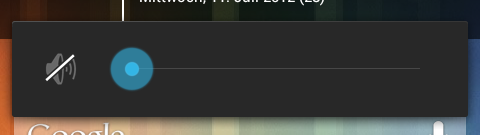
cyanogenmod phone completely silent
As varied as the landscape of Android devices, some things have almost all the tablets and smartphones in common: volume control buttons, for example. A simple shortcut with which you can turn their device completely silent is: volume up and press down at the same time, to hold any key briefly. Also works on the lockscreen.


how to set up Quiet Hours


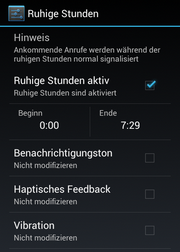
quiet hours cyanogenmod
Who has not - no one dozes off at night just really nice surprise because crows and the smartphone, according to the dessert and announces the arrival of an e-mail. Well-earned sleep rudely interrupted one realizes that it is irrelevant to any newsletters. With a function that is personally one of my loved ones in the CyanogenMod, belongs to the past, this scenario: the so-called quiet hours. Simply define Settings ⇒ ⇒ tones Quiet hours for a period to which you do not want to be disturbed.

The whole thing is only for notice, calls come through anyway. Whos calling at night, it finally has an important reason - hopefully.


Comfortable brightness


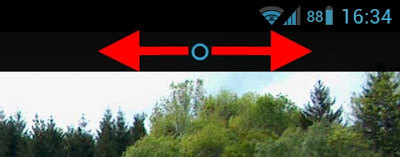
cyanogenmod-notification-brightness

In my opinion, the automatic brightness adjustments of most Android phones is inadequate, self-configurable in the CyanogenMod however a bit too complex and too opaque. No wonder you can still have a fast and convenient way of manual brightness adjustment. Such has the CyanogenMod - clearly inspired by Samsung, which had implemented this function is identical to the software of the Galaxy S1 and S2.

The setting for manually adjusting the brightness can be found under Settings ⇒ ⇒ ⇒ Status Bar brightness control. If this option is enabled and auto brightness off, you can adjust the brightness very easily and quickly: These remain only briefly with a finger on the notification bar, without pulling down. Now wipe the left (darker) or right (lighter).


Apps quit faster

Actually, the multitasking of Android be balanced so well that it re-open apps always provide a sufficient amount of free RAM available. Sometimes it makes sense, but then, an application to quit immediately and quickly. For this purpose, the CyanogenMod has an option for quite some time, with the focus will be finished in exploiting dividend app when you press and hold the Back button. Ended, as in: closed abruptly, not stored and thrown by kick in the pants from the store.
Who would like to use the option, it enables end ⇒ Settings ⇒ Application Developer Tools.


Remove camera sounds


The camera app in the Android standard and CyanogenMod is actually very nice, but has an annoying peculiarity: the shutter sound. The stay in its curdling roars "Klöng" - except when they switched their device completely silent. This can be a tabula rasa-fix method - namely, by deleting the sound files that uses the camera. For this we need a root-enabled file manager like Root Explorer , Ghost Commander or the File Manager by Rhythm software .

With one of these apps in the directory / system / media / audio / ui and navigate the files camera_click.ogg , camera_focus.ogg , VideoRecord.ogg and VideoStop.ogg delete (who is not sure whether he might still files later one needs to rename instead). Voilà - still is the camera.


App shortcuts on the lockscreen


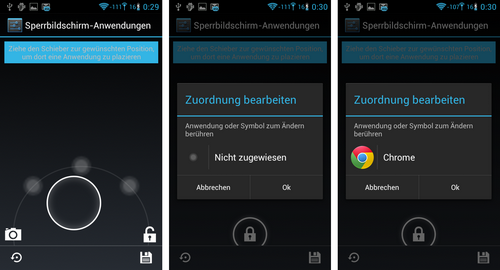
cyanogenmod lockscreen apps

Who wants to have quick access to the most important apps already out of the lockscreen, can these "moving finger" on the lockscreen, the ring-key lock set.


cyanogenmodlockscreen-apps-small

⇒ Settings ⇒ screen lock screen lock applications can be, including the already preset camera app that can be exchanged, to specify three apps. These apps can be run directly on the lockscreen future by pulling the ring on the appropriate icon.
Read More..

CyanogenMod CM10 v1 2 firmware installed on Pipo S1 tablet

1. First, download CyanogenMod CM10 v1.2 firmware from here or from here. 
2. Connect tablet in bootloader mode.
3. If you dont have driver installed you can install it from "drivers" folder.
4. Go to the folder RKDevelopTool_v1.35 and run RKAndroidTool (do not change anything!).
5. If drivers are installed correctly, in the bottom will say "Found RKAndroid Loader Rock Usb".
6. Press Erase IDB and wait after it finish press OK (it will take 10-20 seconds)
7. Then press Run button. Tablet will restart when everything finish. (first run may take up to 5 minutes).

8. Copy the FixS1.zip file on your Pipo S1 tablet and install it via Recovery Menu.


CyanogenMod CM10 v1.2 firmware features
- System ext4
- CWM 6.0.1.5 recovery
- externe SD mounted as NAND (up to 64 GB)
- Internal storager 2,5 GB
- Init.d support
- USB-Hub enable
- Gamepad (PS2, XBox, ...)
- Kernelmodule (cifs, tun, lan, serial)
- Device = Nexus 7
- latest hosts, su, su-binary, busybox
- MX Video-Player, Play Music & Volume+
- Google Chrome, Skype, 4.2 keyboard & clock
- Reboot Menue, Kernel Tuner, Pimp my Rom
- Dateimanager HD (Root)
- Nova Launcher


Enjoy this fine release!


Always keep in mind that this is not a review, just a first look at this firmware. You have to test it more for another details, to see if it satisfies your needs.
Read More..

Blog Archive

Diberdayakan oleh Blogger.